
Short answer: Microsoft’s email security is blocking legitimate business mail. Users may receive error messages. Check if your domain has a DMARC record and set up the TXT record if missing.
TL;DR
- Microsoft's email filters are rejecting some legitimate business emails.
- Errors like 550 5.7.1 or 5.7.23 may appear in Non-Delivery Reports.
- Check if your domain has a DMARC record and set it up if missing.
- Contact support if the issue persists.
What happened?
This issue is about Microsoft’s email filters mistakenly rejecting legitimate business emails. It reportedly began on November 5th and affects users of Outlook, Hotmail, Live, and MSN. The problem is due to a lack of DMARC, SPF, or DKIM records. Fix it by adding a DMARC TXT record or contacting support.
Key facts
| Reported by | CSO Online |
|---|---|
| Date reported | 10 Nov 2026 |
How it works
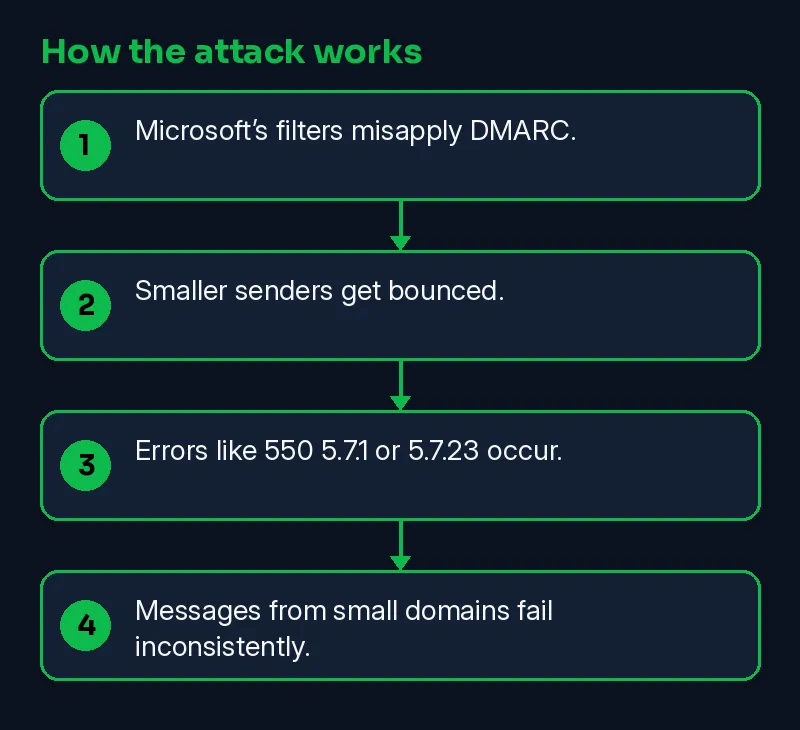
Microsoft’s email security filters use DMARC, SPF, and DKIM to check if emails are legitimate. Without a DMARC record, smaller senders’ emails may be blocked, causing confusion and missed communications.
- Microsoft’s filters misapply DMARC.
- Smaller senders get bounced.
- Errors like 550 5.7.1 or 5.7.23 occur.
- Messages from small domains fail inconsistently.
Skillmate analyst mapping (our judgement, not from the vendor):
- T1566 Phishing
Timeline
| Date | Event | Source |
|---|---|---|
| 2026-11-10 | Reported by CSO Online | CSO Online |
| 2026-11-28 | This Skillmate explainer published | Skillmate |
How to fix it
- Check the sender address and the real link destination before clicking.
- Never share one-time passwords or login codes with anyone.
- Report the message to your IT team or the service's official abuse address.
How to detect it
Look for unexpected email delivery errors, especially if your message was marked with 550 5.7.1 or 5.7.23.
Signs to watch for:
- Messages that push urgency, payment changes or login links.
- Sender domains that look like, but are not, the real company.
- Logins to your accounts right after someone clicked a link.
What is confirmed
- Reported by CSO Online
- Reported by learn.microsoft.com
Why it matters
Users may miss important emails, impacting productivity and safety.
Learn the skills behind this story
Want to understand attacks like this and defend against them? Join Skillmate cybersecurity training or practise hands-on in Skillmate Labs.
FAQ
What is DMARC?
DMARC is a system to prevent email spoofing by checking if a message matches SPF and DKIM records. It tells receivers what to do with unverified messages.
Why are legitimate emails getting blocked?
Microsoft’s filters are blocking emails that lack DMARC records, even for small senders. This is happening due to a policy change and potential bug.
How can I check if my domain is impacted?
Use the command dig +short TXT _dmarc.example.com to check if your domain has a DMARC record. A response starting with v=DMARC1 indicates a record exists.
How can I fix the issue?
Add a DMARC TXT record to your domain with v=DMARC1; p=none to allow all mail and request reports without blocking failures.
Sources
- Microsoft’s email security is unexpectedly blocking legitimate business mail (CSO Online)
- Microsoft (primary source) (learn.microsoft.com)
How we wrote this: facts come from the sources above. An on-prem AI model drafted the plain-English parts and every sentence was checked against the sources; unsupported sentences were removed. MITRE mapping is our own judgement.
Watch today's video brief: https://youtu.be/e-8gKIJlbPQ